Google Veo 3.1: The Ultimate 2025 Guide for AI Video Production
The world of AI video production is evolving at a breakneck pace, and Google's Veo 3.1 is leading the charge. For businesses, marketers, and creative agencies, mastering this new generation of AI video creation tools is no longer optional—it's essential for staying competitive. This guide provides a comprehensive breakdown of what Veo 3.1 is, how it stacks up against competitors like Sora 2, and how its professional-grade features can be leveraged to create stunning, brand-consistent content.
What is Google Veo 3.1?
Google Veo 3.1 is a state-of-the-art generative video model from Google DeepMind, representing a significant leap in fidelity, creative control, and, most critically, integrated audio-visual generation.
Clearing the Confusion: Google's Veo vs. Third-Party Tools
First, a critical clarification: Google's Veo 3.1 is the foundational "engine". You will see many third-party platforms (like veo3ai.io) that act as aggregators, offering access to multiple models, including Veo, Seedance, and Hailuo. Our expertise lies in mastering the foundational Google model and its professional toolsets, which offer far more power and control.
The "Video, Meet Audio" Revolution: Veo 3 vs. Veo 3.1
The single biggest differentiator for Veo 3.1 is its native, synchronized audio generation.
- Veo 3 (May 2025): This model first introduced native audio, generating sound effects, ambient noise, and even dialogue.
- Veo 3.1 (October 2025): This refinement offers "richer, more natural sound" with "better A/V sync". The model generates audio simultaneously with the video from a single prompt.
This capability is a paradigm shift, collapsing the need for separate foley, sound design, and dialogue recording in post-production. The model can interpret prompts like, "'The city always got a story,' the older man murmurs..." and generate the dialogue, the "faint city murmurs," and a "mellow, soulful hip-hop beat" all in one pass.
Core Technical Specifications for Production
For an agency, the specs define the production boundaries:
- Resolution: Production-ready 1080p (1920x1080).
- Aspect Ratios: Native support for 16:9 (landscape) and 9:16 (vertical for Shorts/Reels).
- Base Clip Duration: Typically 8 seconds.
This 8-second limit is not a flaw; it's a feature. It mirrors traditional filmmaking, which is built on a shot-by-shot philosophy. You don't film a 60-second scene in one take; you shoot coverage. Veo's 8-second clip is the "shot," which is then combined with powerful "Extend" and "First/Last Frame" features. This is a high-control workflow designed for professional editors and directors
The 2025 AI Video Showdown
Veo 3.1 doesn't exist in a vacuum. To advise clients, we must compare it to its chief rivals: OpenAI's Sora 2 Pro and ByteDance's Seedance 1.0.
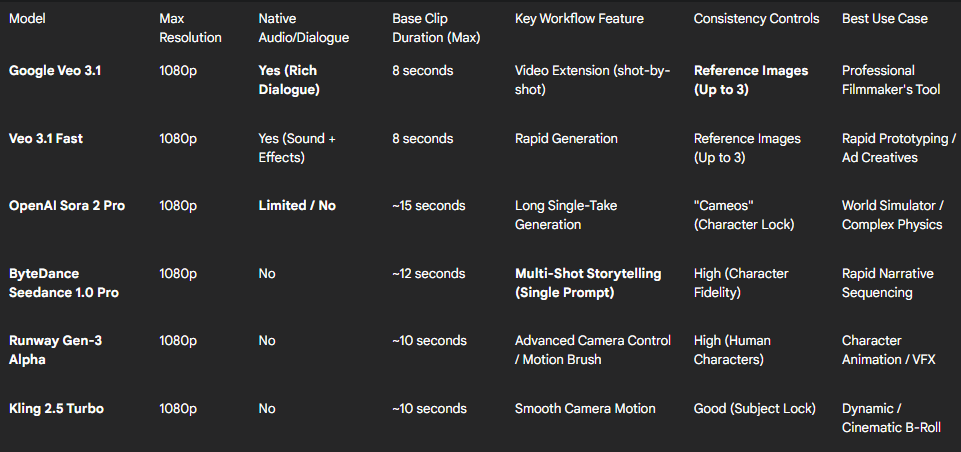
AI Video Model Comparative Feature Matrix (2025)
Veo 3.1 vs. Sora 2: The "Filmmaker" vs. the "Simulator"
This is the headline battle, and it reveals a difference in philosophy.
- Audio: Veo 3.1's primary advantage is its native audio and dialogue. Sora 2 Pro is largely silent, requiring full post-production for sound. This makes Veo 3.1 an end-to-end tool, while Sora 2 is a purely visual generator.
- Workflow: Sora 2 boasts a longer 10-15 second base clip , built for impressive single-take "world simulations." Veo 3.1's 8-second limit is built around its powerful "Extend" feature , designed for an iterative, shot-by-shot construction that mimics professional filmmaking.
- Consistency & Speed: Both offer character consistency (Veo's "Reference Images" , Sora's "Cameos" ). Benchmarks suggest Veo 3.1 has superior visual consistency on regenerations (78% vs. Sora's 62%), while Sora 2 is significantly faster (31% faster generation for a 20s clip).
The Verdict: Veo 3.1 is the "Filmmaker's Tool". It's for high-control, shot-by-shot production where audio is integral. Sora 2 is the "World Simulator" , excelling at complex physics and mesmerizing single takes.
Veo 3.1 vs. ByteDance Seedance 1.0: The Workflow Battle
Seedance 1.0's killer feature is "multi-shot storytelling". It can interpret a single complex prompt and generate a sequence of connected shots (e.g., wide, medium, close-up). This creates a workflow choice:
- Veo 3.1 (High-Control): The "Director's" approach. You generate Shot 1, review it, then use its last frame to generate Shot 2, maintaining granular control.
- Seedance 1.0 (High-Level): The "Producer's" approach. You declare the 3-shot sequence you want and let the model generate it for rapid prototyping.
A Producer's Guide: How to Use Veo 3.1's Professional Toolkit
The true value for an AI video production agency is in Veo 3.1's creative controls. These features are what separate professional, branded content from amateur generations.
Workflow 1: "First and Last Frame" for Generative Storyboarding
This is a pre-production game-changer. This mode allows you to provide two static images—a starting frame and an ending frame—and prompt Veo 3.1 to generate the transition between them, complete with coherent motion and matching audio.
This turns a static pitch deck into a living animatic. A client no longer has to imagine the "slow dolly zoom" connecting two storyboard frames; they can see it. This provides unprecedented directorial control and ensures full client buy-in before production.
Workflow 2: "Reference Image" for Brand & Character Consistency
The biggest blocker for using AI video in branded content has been consistency. Veo 3.1 addresses this with its Reference Image mode. You can use up to three reference images to guide the generation.
This "locks in" the appearance of a specific character, product, or aesthetic across multiple, discontinuous shots. For our agency, this unlocks reliable, professional-grade content:
- Branded Content: A client's product is "locked" from a photo, ensuring perfect visual integrity in every shot.
- Narrative Storytelling: A main character is established and can be believably placed in different scenes and angles.
Workflow 3: "Extend" for Creating Long-Form Content
The "Extend" feature is the professional answer to the 8-second clip duration. This allows you to take a Veo-generated clip and extend it by 7 seconds. This process can be repeated up to 20 times, enabling the creation of long, continuous sequences that can be minutes in length. (Note: The input clip must be a 720p Veo-generated video).
This is the modern AI production pipeline. It enables an iterative, high-control workflow where an editor builds a scene shot-by-shot, maintaining creative control at each step.
Where to Access Veo 3.1: Google Flow vs. The API
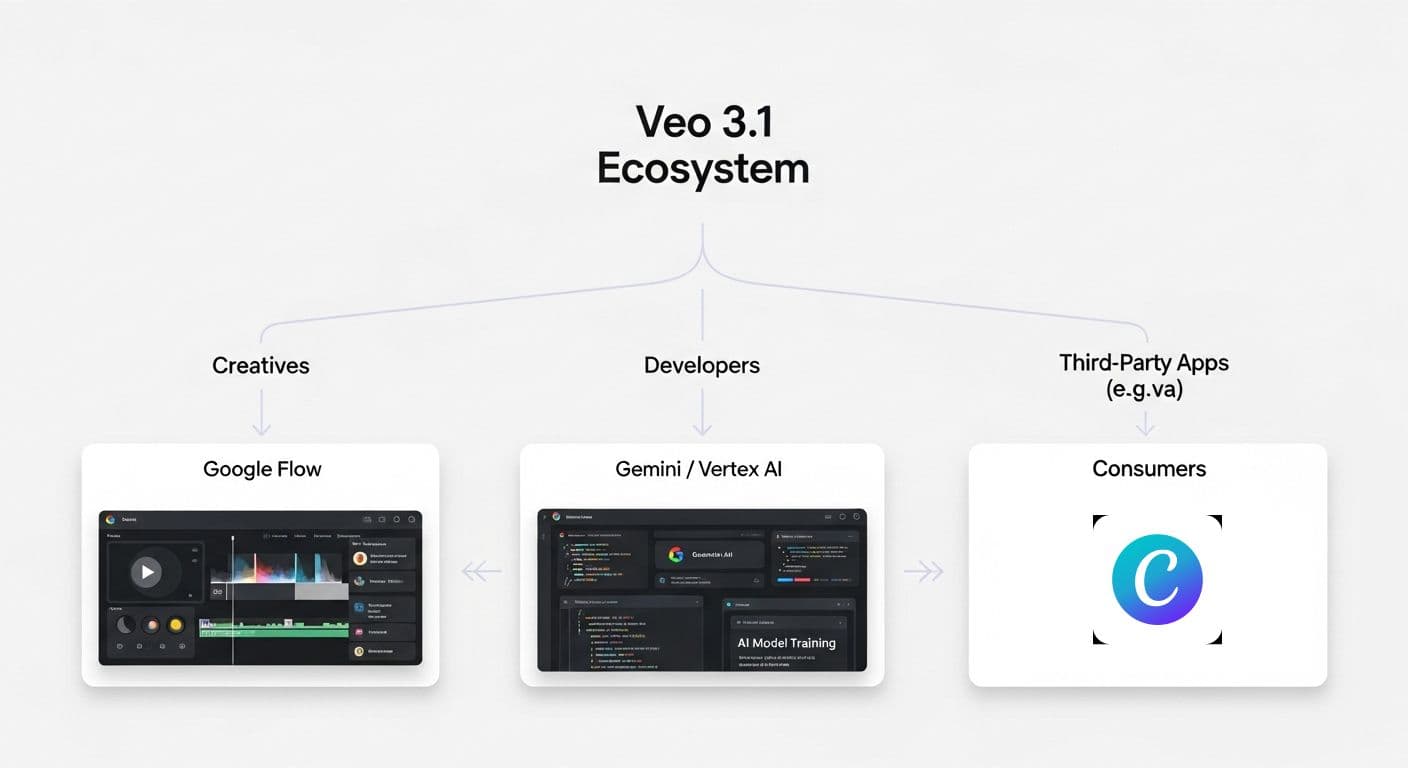
Understanding the ecosystem is key. Google is placing its "engine" inside different "dashboards" for different users.
The Professional Hub: Google Flow
Google Flow is the flagship, professional-grade application for Veo 3.1. It is an "AI-powered filmmaking workspace" that integrates Veo, Imagen (for images), and Gemini (for text) into one NLE-style (Non-Linear Editor) interface. It is the only tool custom-designed to integrate the entire suite of creative controls: Text-to-Video, Frames-to-Video, Reference Images, and Video Extension. Access is available via paid plans like Google AI Pro ($19.99/mo), which includes Veo 3.1 and 100 generations per month.
The Developer/Enterprise API: Gemini & Vertex AI
For scalable or custom applications, Veo 3.1 is available via the Gemini API (for developers) and Vertex AI (for enterprise). This provides backend access and reveals the hard cost: $0.40 per second for Veo 3.1 Standard and $0.15 per second for Veo 3.1 Fast. An 8-second, high-quality clip costs approximately $3.20 to generate.
The Mass-Market Integrations: Canva, Leonardo.Ai, etc.
Google's broadest move is integrating Veo 3.1 into platforms where millions of users already work, such as Canva, Leonardo.Ai, Fotor, and Envato. Canva, for example, offers Veo 3.1 to paid subscribers (5 generations/month).
This means your clients will soon have basic access. Our agency's value proposition must therefore shift from "we have access to AI video" to "we have mastered AI video in a professional (Google Flow) environment."
Beyond the Hype: Risks, Deepfakes, and Responsible AI Production
With great power comes great responsibility. The 1080p realism and synchronized dialogue that make Veo 3.1 powerful also make it a potent tool for misuse.
- The Risk: Hyper-realistic deepfakes are a significant concern. In 2024, fraudsters used a deepfake of a CFO to authorize a $25 million transfer. The tools can also be used to create social misinformation, such as faked videos of police incidents to fuel unrest.
- The Safeguard: SynthID: Google's primary safeguard is SynthID, an imperceptible digital watermark embedded in generated content to identify it as "synthetic". YouTube will likely use this to automatically label AI content.
- The Limitations: SynthID is not a silver bullet. It can be "degraded" by heavy editing and is not a universal standard—it can't detect a Sora 2 video. It is a deterrent, not a guarantee.
As a trustworthy agency, we build a "Responsible AI Production Pledge" into our work. We exclusively use models with built-in safeguards like SynthID, refuse work intended to mislead, and support open standards for content authentication. This addresses client fears and builds essential trust.
\
How Our Agency Uses Veo 3.1 to Drive Business Results \
Understanding the tech is one thing. Turning it into revenue is another. We have packaged Veo 3.1's features into new, high-value services for our clients.
New Service: "Generative Storyboarding & Animatics"
- Technology Used: Veo 3.1's "First and Last Frame" control.
- Our Value Proposition: "Stop guessing. We turn your static storyboard into a living animatic. We generate the exact camera motion and transitions between your keyframes, complete with audio, so you can approve the full creative flow before production begins."
New Service: "Brand-Consistent AI Content"
- Technology Used: Veo 3.1's "Reference Image" subject locking.
- Our Value Proposition: "We solve AI's consistency problem. Our 'Subject Lock' technique uses Veo 3.1's reference image capabilities to ensure your brand, product, and characters are 100% consistent across every single video, every single time."
New Service: "Rapid Audio-Visual Ad Prototyping"
- Technology Used: Veo 3.1's native audio/dialogue and the
veo-3.1-fast-generate-previewmodel. - Our Value Proposition: "Why A/B test one ad concept when you can test twenty? We use Veo 3.1's 'Fast' model to rapidly prototype dozens of audio-visual ad creatives—each with different dialogue, sound effects, and visuals—in the time it takes to produce one traditional spot."
Conclusion: The Future of AI Video Production
Google Veo 3.1 is more than just an "AI video generator"; it is a professional filmmaking tool. Its true power is unlocked not by a single prompt, but through its suite of iterative controls inside the Google Flow workspace.
For AI video production agencies, the path forward is clear. Our value is no longer just in production logistics; it is in creative direction, technical mastery, and responsible stewardship of these powerful new tools.